
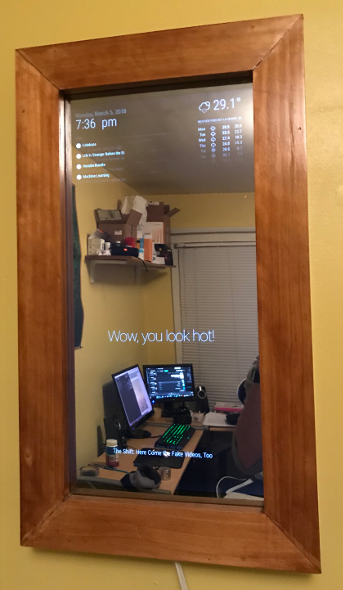
One year ago I decided to join the Internet of Things community enthusiasts and went out to built my very own smart mirror. For those unaware, a smart mirror is a double-sided mirror that sits in front of a monitor attached to a computer, Raspberry Pi being the popular choice. This post aims to provide a broad view on the hardware or software used to develop a mirror like this. Hopefully this can offer some tips for future builders. If you’re looking for a more detailed guide on the hardware behind building a magic mirror, check out Dylan Pierce’s blog post as well as this video by HackerHouse. If you’re looking for a guide on the software behind these these mirrors, checkout out the MagicMirror² project. MagicMirror² is an open-source, modular smart-mirror platform that has some built-in widgets and and a growing library of third party modules.
The Monitor
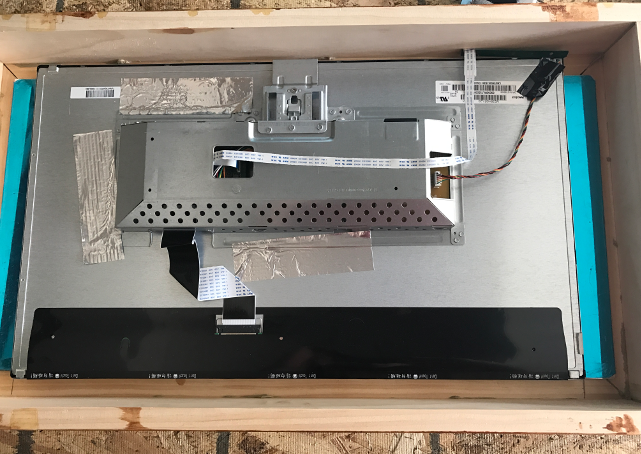
If you’re planning on building a smart mirror or another panel-based IOT device, the monitor should to be your starting point. Since the size of your monitor dictates the size of your frame, you need to select a size before you go out and start buying materials. I recommend going bigger if you can. I got lucky and found a bright 25” monitor on craigslist that worked great. You’ll want a bright monitor that has HDMI output as it is the only native support for Raspberry Pi. Oh, and you have to be content with removing the bezel from your monitor.
The Mirror
Choosing the type of mirror halted my progress for a while. Despite really only two main choices, glass and acrylic, it seemed like there were a lot of factors to consider. This is what I determined for my build, and is subjective.
| Acrylic | Glass | |
|---|---|---|
| lighter | weight |
heavier |
| susceptible | "fun house" effect |
none |
| more | light passage |
less |
| less | price |
more |
| low | chance of breaking |
high |
| nope | smudge resistance |
nope |
For these reasons, I chose to go with this 12” x 24” 3mm thick acrylic mirror. I can see why some builders choose glass over acrylic. The rigidness of the glass prevents bends and warps in the mirror. This is that “fun house” effect I mentioned above. However, the light passage on most of these mirrors, even the ones that are specifically targeted towards smart mirror builders still didn’t seem to have enough light passage to create a display that really pops. I think this video illustrates this well. There is a third option, mirror film, which is applied over a standard mirror. This seems to be a fairly popular choice for builders going for larger displays, like a big bathroom mirror. I didn’t investigate much into these, but you can find plenty of information about them in the MM builders forums.
The Box
Building the casing and front-facing frame is likely the most taxing and time consuming part of the build process. It’s helpful to have someone with at least some basic carpentry skills at your side for this part. Thankfully I had my stepfather, Dave, to help me here. Many guides recommend using 2 x 4’s to build the casings. However, we went with a 1 x 3 approach which resulted in a really slim and sleek looking case. We used similar boards to build the frame for the front. I won’t go into the details here since the dimensions of your frame will be different than mine, but it’s best to not over-think and do whichever works best for the type of mirror you’d like to build. 0Stick to a rigid guide if need be.
There are some select guides I’ve not mentioned that recommend using nails to secure the frame. An easier approach is to use glue, liquid nails or otherwise, to secure the boards together and then use screws for additional security. The screw sizes should depend on the thickness of your boards, just ask your local home depot dude! What I’ve gather from the MM community is that glue is a better and more reliable solution.
An important detail to note: MAKE SURE YOUR MIRROR IS VENTILATED. Seriously, this is likely going to be a wood frame so make sure that you’re getting plenty of airflow. I drilled several ~2.5” holes at the top and the bottom of my frame that gives the Pi and monitor enough breathing room to not burn your house down.
The Software
I highly recommend using MagicMirror² as starting point for the code that will power your mirror. MM² is equipped with powerful guides, a capable API, and plenty of community members who are willing to help you. Configuration is very easy and extensive. Also, since the project is open source you are free to tinker with the source yourself. I was able to get my mirror up and running while only having to write a few lines of code. Magic Mirror projects are built up of modules. As the name suggests, modules control a contained component of the mirror. There are some default modules to get you going, such as a weather forecast widget, clock, news feed, and a few others.
My favorite part about this platform is the large number of third-party modules that are being developed and supported by the community. There are all sorts of modules ranging from IOT device management, voice control, media players, modules to manage other modules, and even one for facial recognition! There is also a template module for integrating your own projects into MM². I decided to include two additional modules into my mirror. One was to display my most recent emails, a pretty simple setup, and another to integrate some layer of voice control via Google Voice Assistant. Mostly, I use this to toggle the monitor display. The latter was a bit more difficult and involved diving into the Raspberry Pi video documentation.
Conclusion

Here is what I discovered after one year with the mirror:
- Building a MM is a fun way to explore basic carpentry skills and get introduced to IOT device management.
- Magic mirrors will add heat to your room, so be cautious if building in a warm environment (I don’t really use mine during the summer).
- MM² is a great place to get started with open source development. The templates they provide make it easy to integrate your existing apps into a MM module.